
Lesson 2 Independent courseAffiliate links · Disclosure
Coldbet Registration: Creating Your Account
In this lesson you'll go through Coldbet registration from the first tab of the form to an account that's ready for withdrawals. You'll choose a way to sign up, fill in every field in order, learn when verification is requested and take the first steps that keep your cash-out route clear later on.
 Written by Kate Ashworth · Course editor, The Playbook

Part 1
Ways to Register for Coldbet
How many ways are there to sign up? The Coldbet sign up form offers several, shown as tabs across the top, and they differ mainly in the contact you start from and the fields that follow.
What to Have Ready Before You Create a Coldbet Account
What should be within reach before you start? Keep your phone nearby, because the phone option sends a code by SMS; if you'd rather use email, have your inbox open. Decide in advance which currency the account should use, since the form asks for it.
Remember the basic rule as well: the platform is for adults only, 18+. And open Coldbet registration through the current access button on this page, never through an address typed from memory, so that the form you fill in is the real one. With these three things sorted, the form itself takes a few minutes. Set aside a quiet moment rather than squeezing it in between other tasks: a calm first pass through the form, with the phone in your hand when the code arrives, saves a second attempt later.
The Options on the Coldbet Registration Form
Which way should you choose? The form lists By phone, By email and Social networks as separate tabs, and if you already have an account, skip ahead to the lesson on logging in.
The phone option asks for your number with a country code, a delivery method for the code, the account currency and the verification code you receive. The email option starts from your email address instead of a phone number, and the social networks tab connects the new account to a profile you already use elsewhere. If you're unsure, the phone tab is the most direct route: the number you confirm during sign-up is one of the two contacts that later have to be confirmed for withdrawals anyway.
Whichever tab you pick, you create one Coldbet account that opens both the sportsbook and the casino. The choice only affects how you start and which contact the platform knows first; everything after sign-up works the same way.
Part 2
The Form, Field by Field
How do you fill in the Coldbet registration sign-up form without second-guessing each box? Follow it from top to bottom, in the same order as on the screen.
Filling In the Form Step by Step
Here's the phone tab, the first option on the form:
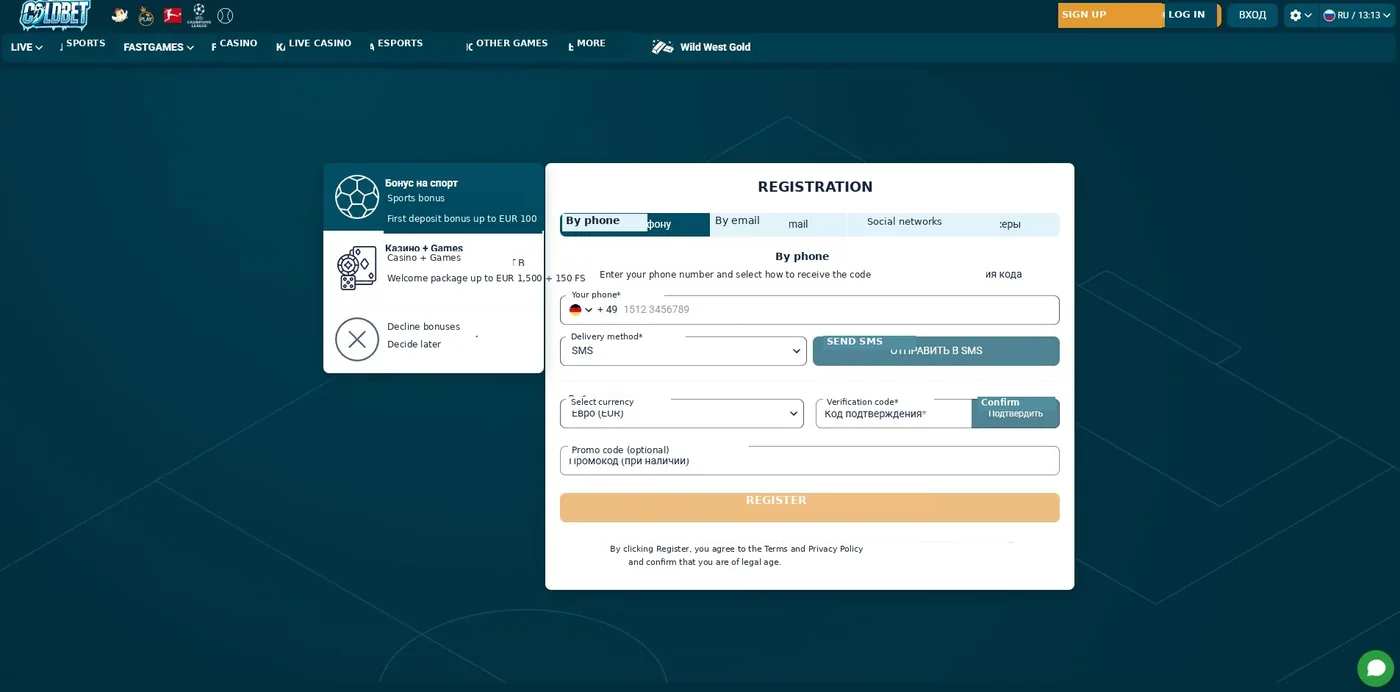
- 1tabs By phone, By email and Social networks
- 2phone field with country code and SMS delivery method
- 3currency selection, verification code and Confirm
- 4optional promo code field and Register button
- 5bonus choice panel on the left

Exercise
Form walkthrough: the phone tab
1 / 8
- 1Choose the By phone tab. It's the first option and the one shown on the screenshot.
- 2Enter your phone number. Pick the country code from the flag menu, then type the rest of the number, the one you'll keep using, because it becomes a way to sign in and to restore access.
- 3Choose the delivery method and send the code. SMS is the method shown in the field; press Send SMS to receive the code.
- 4Select the currency. The account currency is set here, in the form itself, so choose it with your future deposits in mind.
- 5Enter the verification code and press Confirm. This short check is the first step of Coldbet account verification: it proves that the phone is yours.
- 6Fill in or skip the promo code. The field is marked optional.
- 7Choose a bonus or decline it. The panel to the left offers a sports bonus, a casino and games welcome package, or the option to decline bonuses and decide later.
- 8Press Register. By doing so you accept the Terms and the Privacy Policy and confirm that you are of legal age.
The Promo Code Field
Do you need a code to create a Coldbet account? No. The promo code field is an ordinary optional field, and the form goes through with it left empty. If you have a code from an official Coldbet source, this is where it goes; if not, skip it and finish the Coldbet sign up. Leaving it empty doesn't change the bonus choice in the panel beside the form. Be careful with codes copied from unofficial pages: the operator isn't obliged to accept them, and a wrong code in the field only adds an error message to an otherwise simple step.
 FactColdbet registration works without a promo code, and the field is marked optional on the form itself.
Part 3
Coldbet KYC and Verification
Do you have to upload documents to register? No: Coldbet KYC is not part of registration. Verification comes later, and only on request.

When a Check Is Requested and What to Prepare
When does an identity check happen? Only when the Security Team asks for one. Coldbet registration itself requires no documents, and until a request arrives, nothing has to be uploaded.
That keeps sign-up quick, but it puts the responsibility on you: the details in your personal profile should be accurate from the start. Your name, date of birth and address should match what you would show if asked, so that confirming your identity takes one reply rather than a long exchange.
If a Coldbet account verification request does arrive, answer it promptly. Support is available 24/7 through live chat and email if anything in the request is unclear, and the Security Team can also be reached at security@cold.bet. A check is a routine step in protecting the account, not a sign that something went wrong.
What Keeps Withdrawals Closed
What stands between a new account and the first cash-out? The table sums up the conditions:
| Requirement | Status needed |
|---|---|
| Personal profile | Filled in |
| Email address | Confirmed |
| Phone number | Confirmed |
| Verification (KYC) | Only at the Security Team's request |
In plain words: until the personal profile is filled in and both the email and the phone are confirmed, the withdrawal option stays closed. KYC stands apart from that list. It isn't a standing condition, only something the Security Team may ask for.
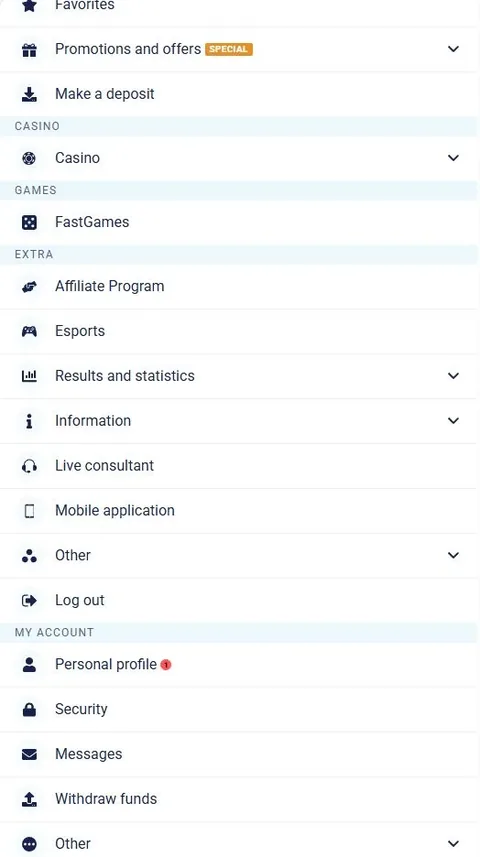
- 1My account block
- 2Personal profile with a reminder mark
- 3Security
- 4Withdraw funds
On a phone, the My account block of the menu holds the personal profile, the security settings and Withdraw funds in one place, so after Coldbet registration you can finish all three without hunting through the site. The small red mark next to Personal profile stays there until the profile is complete.
Part 4
After You Sign Up
What should you do in the first minutes after Coldbet sign up? A little housekeeping now decides how smoothly the first withdrawal goes later.
First Steps in Your Account
Work through these four steps before you place a first bet:
Withdrawals can open, according to the operator
Once these four are done, a new Coldbet account is ready for everything the course covers next, and a withdrawal won't stop at a missing field. Most of the work takes place in a single screen, the personal profile, so one visit is usually enough.
Choosing the Account Currency at Coldbet Sign Up
Which currency makes sense? The platform lists 109 currencies, with AUD (Australian dollars), USD, EUR and crypto among them, and you choose yours in the registration form itself, in the Select currency field.
Both the casino and sports welcome amounts are stated in AUD. Choose the currency you plan to deposit in to make your balance and deposits easier to follow.
Crypto is also available for readers who already hold it.
Part 5
Where to Go Next
Account ready? The Coldbet casino guide is the next lesson: it shows how the lobby is laid out and what each game category holds.
If you joined the course at this point, the starting lesson on Coldbet covers access, licences and the platform sections in one place, including why the address always comes from the button.
Wrap-up
What you've learned
After this lesson on Coldbet registration, you can now:
Lesson complete
Questions readers ask
FAQ
How old do I need to be to register?
You must be 18 or older. By pressing Register you confirm that you are of legal age, and no part of the platform is meant for anyone younger.
Can I leave the promo code field empty?
Yes. The promo code field is optional, so Coldbet registration goes through without it. Enter a code only if you have one from an official Coldbet source.
When is Coldbet KYC triggered?
Only when the Security Team requests it, not at registration. Until then no documents are needed, so keep your profile details accurate to confirm them quickly if asked.
Can I create a second Coldbet account?
No, the rule is one account per person. A single account already covers both the sportsbook and the casino, so a second one adds nothing.
Which currency should I pick?
Pick the one you plan to deposit in. AUD (Australian dollars), USD, EUR and crypto are among the 109 currencies on offer, and the casino and sports welcome bonuses are stated in AUD.
Homework
Conclusion
In this lesson you've covered Coldbet registration from start to finish: the ways to sign up, the form field by field, verification that comes only on request and the first steps that open withdrawals.
The platform is for adults 18+ only. Play responsibly, set your own limits, and if gambling stops being fun, help is available from Gambling Help Online on 1800 858 858.
Ready to open your account? Click the button below to reach the registration form through the current address.